Table of Contents
ToggleStanding desks have moved from trendy office gadget to practical fixture in home workspaces. If you’re spending eight hours a day hunched over a seated desk, your back, and your focus, pay the price. A standing desk nearby doesn’t require knocking out walls or hiring contractors. Whether you’re converting a corner of your bedroom, transforming a closet nook, or claiming real estate in your living room, this guide walks you through the setup process like a handy neighbor. We’ll cover location selection, measurements, ergonomic positioning, and workspace organization so your standing desk actually improves your work routine instead of becoming an expensive filing cabinet.
Key Takeaways
- A standing desk nearby improves posture and circulation by allowing you to alternate between sitting and standing every 30 to 60 minutes, reducing fatigue and boosting focus throughout your workday.
- Optimal placement requires a location with proximity to power outlets, natural side lighting, good ventilation, and minimal high-traffic foot traffic to ensure you’ll actually use the desk consistently.
- Your standing desk surface should position your elbows at a 90-degree angle with monitor top at or slightly below eye level, typically requiring desk heights between 38 to 48 inches depending on your height.
- Cable management and minimal desktop clutter are essential—use cable clips and organize storage nearby rather than on the work surface to maintain comfort and reduce cognitive load while standing.
- Floor stability and proper measurements (allowing at least 12 inches of clearance on each side) prevent wobbly setups and ensure your standing desk functions as intended rather than becoming an expensive filing cabinet.
Why Standing Desks Matter for Your Home Office
Sitting for extended periods tightens hip flexors, weakens your glutes, and rounds your shoulders forward, the classic “desk hunch.” Standing desks interrupt that pattern by forcing your body to engage stabilizer muscles and shift position throughout the day. You’re not standing still for eight hours straight: the goal is alternating between sitting and standing every 30 to 60 minutes.
Beyond posture, standing desks improve circulation and can boost focus. Studies suggest that alternating positions reduces fatigue and keeps energy levels steadier than static seating. For home workers especially, a standing desk breaks the monotony of staying in one spot and creates a mental boundary between “office mode” and “home mode.”
The catch: a standing desk only works if it’s genuinely convenient. If you have to clear clutter, hunt for a cable, or perform three steps to reach it, you’ll abandon it after two weeks. That’s why placement and setup matter as much as the desk itself.
Finding the Right Location in Your Home
Scan your home for unused real estate: a corner of the bedroom, an underutilized dining room section, a nook in the hallway, or even a dedicated closet conversion. The spot should be within arm’s reach of your internet connection (or be willing to run ethernet or boost your Wi-Fi range). Avoid placing a standing desk in a high-traffic walkway, you’ll feel rushed and exposed, and family members will constantly squeeze past you.
Think about power outlet proximity. You’ll need at least two outlets: one for a monitor and one for a lamp, phone charger, or other accessories. If outlets are scarce, budget for a quality surge-protected power strip (not a cheap daisy-chained model) and route cables neatly.
Temperature matters too. If the spot sits directly under a vent, heat register, or next to an exterior wall in winter, you’ll either freeze or sweat. A moderately climate-controlled area keeps you comfortable during long work sessions.
Assessing Natural Light and Ventilation
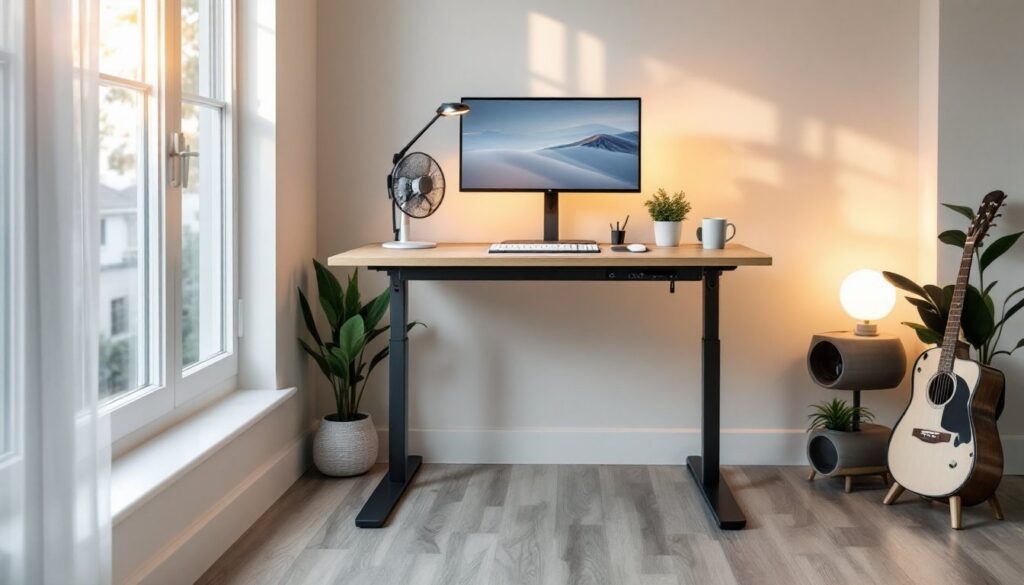
Natural light reduces eye strain and supports your circadian rhythm. Position your desk so that windows are to your side or behind you, never directly in front, as that creates glare on your monitor. If the space gets zero natural light, invest in a good LED desk lamp (aim for 3000–4000K color temperature) that mimics daylight without harsh shadows.
Ventilation prevents stuffiness and keeps your mind sharp. A small tabletop fan or open window nearby works fine. Stuffy rooms trigger fatigue faster than anything else, especially when you’re standing. Even if the spot feels perfect otherwise, poor air circulation will drive you away.
Essential Setup Requirements and Measurements
Before buying anything, measure your space carefully. A standard standing desk footprint is roughly 48 inches wide by 24 inches deep, though compact models start at 36 inches wide. Measure your chosen spot, leaving at least 12 inches of clearance on each side for movement and cable routing. If space is tight, a corner standing desk or L-shaped configuration maximizes usable surface without monopolizing the room.
Next, account for what sits on the desk. You need room for a monitor (or two, if you’re ambitious), a keyboard, a mouse, and some breathing room for papers or a coffee mug. Cramped desks defeat the purpose. If surface area is limited, consider a monitor arm that clamps to the desk edge, it frees up workspace and lets you adjust screen height without stacking books underneath.
Floor stability matters more than people think. A standing desk on uneven flooring feels wobbly and discourages standing. If your floor is unlevel, shim the desk feet with plastic shims (available at any hardware store) to dial in a solid footing. Test it by pressing down on the corners, there should be zero flex or rocking.
Desk Height and Ergonomic Positioning
The golden rule: when standing, your elbows should be at a 90-degree angle with your arms relaxed at your sides, and your wrists should be neutral, straight, not bent up or down. This typically means your desk surface lands at roughly 38 to 48 inches from the floor, depending on your height. Taller individuals aim toward 48 inches: shorter folks might land around 40 inches.
Electric adjustable desks let you dial in the exact height, which is a game-changer for households with people of different heights sharing the desk. Manual crank desks are cheaper but require more effort to adjust. Fixed-height desks are the cheapest but only work if everyone using it falls within a narrow height range.
Monitor height is equally critical. The top of your screen should sit at or slightly below eye level when you’re standing upright. Your gaze should travel downward about 15 to 20 degrees. Too high, and you strain your neck backward: too low, and you hunch forward. Use a monitor arm or a sturdy stand to fine-tune this, don’t just plunk a monitor flat on the desk surface. You can find budget-friendly monitor arms and standing desk plans at resources like woodworking DIY tutorials or free standing desk designs if you’re comfortable building a custom setup.
Keyboard and mouse should hover at the same height as your desk surface. Your wrists should never be bent upward (which causes carpal tunnel issues). If your desk is at proper height but your keyboard is too low, your wrists hyperextend, equally bad. Invest in a thin keyboard tray or wrist rest (even a rolled towel works in a pinch) to maintain neutral wrist position.
Creating an Organized and Functional Workspace
A cluttered standing desk becomes a staring desk. Before finalizing your setup, ruthlessly edit what actually needs to be within arm’s reach. Keep a notebook, pen, and your immediate work materials on the desktop surface. Everything else, reference books, files, old cables, goes on a nearby shelf or in a cabinet.
Cable management separates a professional setup from a tangled mess. Use cable clips, ties, or spiral wrap (not masking tape, which degrades quickly) to bundle cords along the underside or back edge of the desk. Label each cable at both ends with a tiny piece of tape so you know what’s what if something needs troubleshooting. Route power cables to one side and data cables (USB, ethernet) to the other to minimize interference and confusion.
Storage within arm’s reach should be minimal. A small organizer tray for pens and a desk lamp are reasonable. Avoid piling papers, books, or trinkets on the workspace itself, visual clutter increases cognitive load and makes standing feel cramped. If you need file access, position a narrow filing cabinet or shelving unit to the side of your desk, not behind it (where it blocks light and air).
Lighting deserves its own attention. A good adjustable desk lamp (LED, dimmable if possible) eliminates shadows and reduces strain. Position it off to the side so it illuminates your work without glaring on your monitor. If you combined this with natural side light, you’ve solved 90% of workspace comfort issues.
Finally, test the setup by actually standing and working for 15 minutes before declaring it done. Walk around the space. Reach for items. Adjust your monitor. Only after a real trial run should you secure cables and call the project complete. Comfort is personal, what works for your neighbor might feel awkward for you. The best standing desk setup is one you actually use, which means it has to feel natural from day one.
Conclusion
Setting up a standing desk nearby transforms your home office from a one-position slouch to an active, flexible workspace. Start with location (convenient, well-lit, good airflow), nail your measurements and ergonomics, and keep the workspace lean and organized. Your back, energy, and focus will thank you, provided you actually use it. The desk is only as good as your commitment to standing for those 30-minute intervals and moving between sitting and standing throughout the day. You can find step-by-step guides and project inspiration on platforms like Instructables if you’re designing a custom solution. Measure twice, set up once, and enjoy a workspace that works as hard as you do.